> ## Documentation Index
> Fetch the complete documentation index at: https://docs.togai.com/llms.txt
> Use this file to discover all available pages before exploring further.
# Invoices overview
In a usage based pricing model, customers find it hard to predict their costs due to the variability in their usage. It is extremely important for customers to know their consumption data & patterns in real-time. Just showing usage metrics to customers is not sufficient. Customers need to be aware of their costs for the current cycle in real-time so that they can always keep track and not be surprised at the end of the cycle.
**Togai's invoicing system is intrinsically built to handle real-time rating and billing requirements to meet the above basic expectations of the customers.**
 ## How invoicing works?
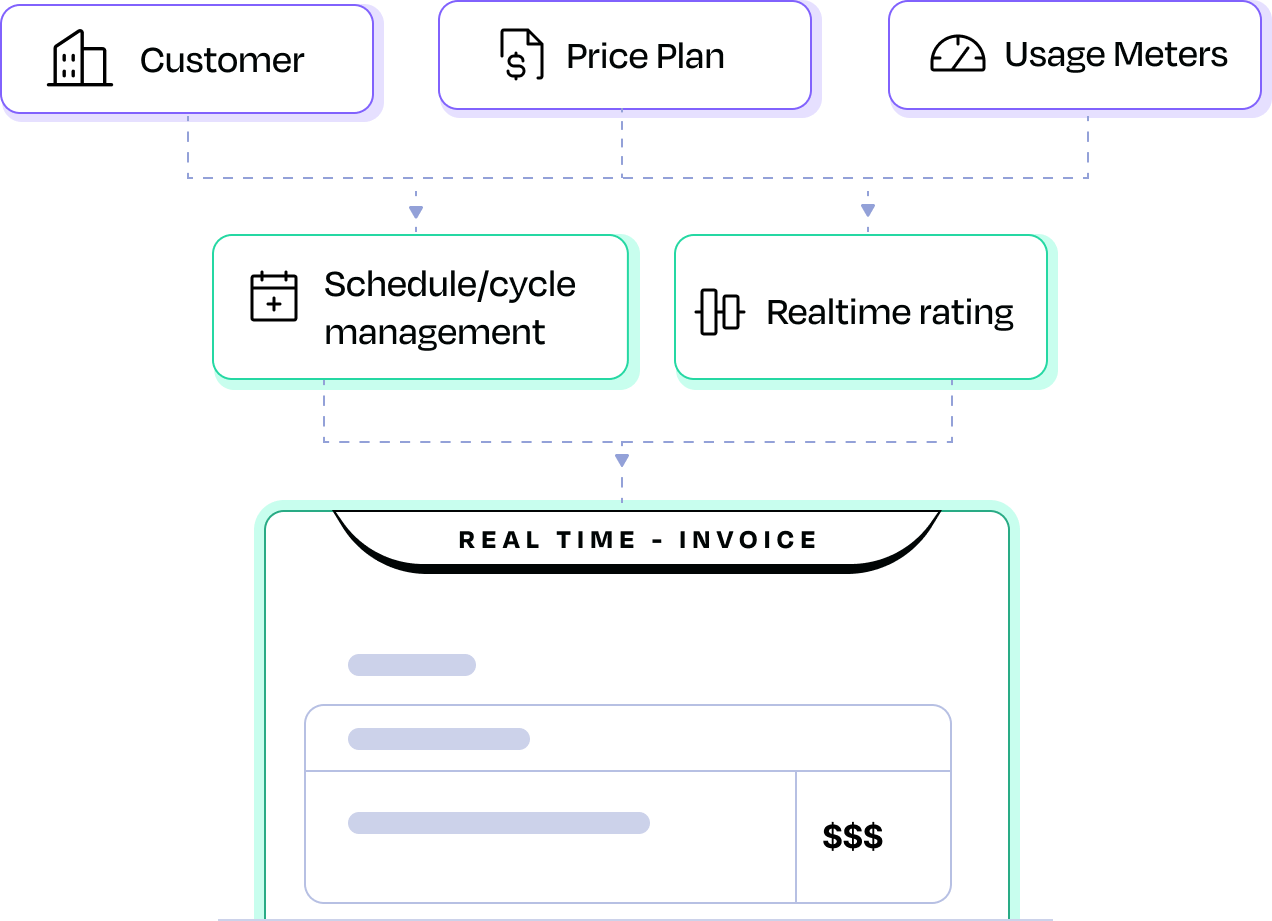
Togai automatically generates invoices for each account/group based on the following -
* Wait till end of grace period for a billing cycle
* List of rate cards in the price plan
* Usage quantity for each rate card
* Pricing model and type for each rate card to be applied to relevant usage slab
* Apply pricing rules
* Apply Credits and commitments
* Apply custom charges
* Manage tax, if applicable
* Calculate gross and net amounts and generate the final invoice based on the invoice template
* Automatically send the generated invoice to customers
Togai follows the minimum divisible currency model. If amount is `$0.001` then it gets rounded down to `$0` in the invoice and will not get synced to external payment processors but if its `$0.01` then `$0.01` will be shown in the invoice and it will get synced to external payment gateways.
## Invoice statuses
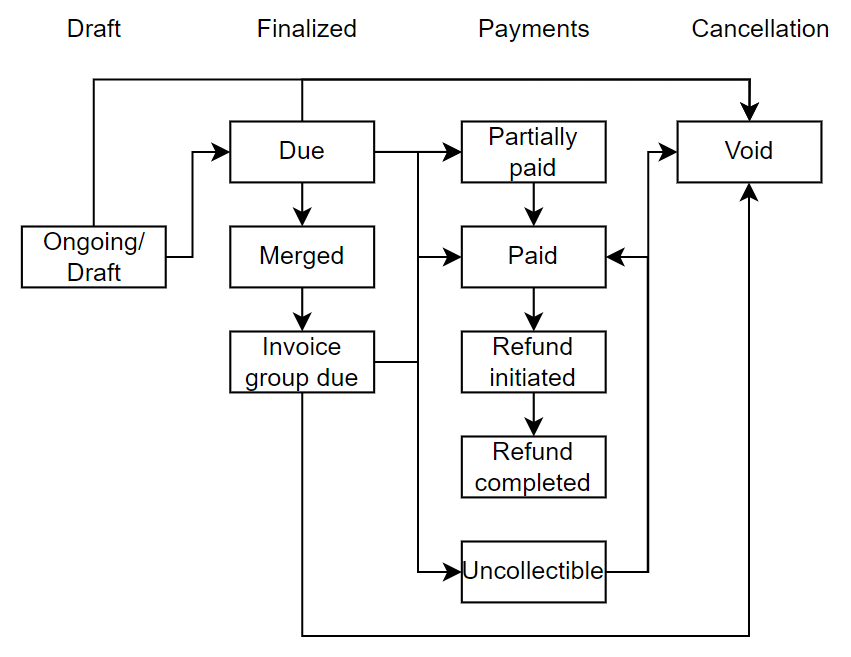
* **Draft/Ongoing** - This is the status of an invoice that has 'In Arrears' rate cards during the current billing cycle. It is also the status of a custom invoice that is yet to be marked Due.
* **Due** - As soon as the grace period ends, the Ongoing invoice becomes 'Due'
* **Merged** - This is the status of an invoice that becomes Due but is merged into an '[Invoice Group](/docs/invoice-groups)'
* **Paid** - This is the status of an invoice for which payment has been received
* **Partially Paid** - This is the status of an invoice for which partial payment has been received
* **Uncollectible** - If you have an invoice where you do not expect the customer to pay, you can mark the invoice as 'Uncollectible'
* **Void** - You can also cancel an invoice using this option
* **Refund Initiated** - In case an invoice is paid or partially paid, it can be refunded and this is the status of an invoice for which a refund has been initiated.
* **Refund Completed** - This is the status of a paid/partially pad invoice for which refund has been completed.
## How invoicing works?
Togai automatically generates invoices for each account/group based on the following -
* Wait till end of grace period for a billing cycle
* List of rate cards in the price plan
* Usage quantity for each rate card
* Pricing model and type for each rate card to be applied to relevant usage slab
* Apply pricing rules
* Apply Credits and commitments
* Apply custom charges
* Manage tax, if applicable
* Calculate gross and net amounts and generate the final invoice based on the invoice template
* Automatically send the generated invoice to customers
Togai follows the minimum divisible currency model. If amount is `$0.001` then it gets rounded down to `$0` in the invoice and will not get synced to external payment processors but if its `$0.01` then `$0.01` will be shown in the invoice and it will get synced to external payment gateways.
## Invoice statuses
* **Draft/Ongoing** - This is the status of an invoice that has 'In Arrears' rate cards during the current billing cycle. It is also the status of a custom invoice that is yet to be marked Due.
* **Due** - As soon as the grace period ends, the Ongoing invoice becomes 'Due'
* **Merged** - This is the status of an invoice that becomes Due but is merged into an '[Invoice Group](/docs/invoice-groups)'
* **Paid** - This is the status of an invoice for which payment has been received
* **Partially Paid** - This is the status of an invoice for which partial payment has been received
* **Uncollectible** - If you have an invoice where you do not expect the customer to pay, you can mark the invoice as 'Uncollectible'
* **Void** - You can also cancel an invoice using this option
* **Refund Initiated** - In case an invoice is paid or partially paid, it can be refunded and this is the status of an invoice for which a refund has been initiated.
* **Refund Completed** - This is the status of a paid/partially pad invoice for which refund has been completed.
 ## Invoicing features
As part of the invoice module, Togai provides additional capabilities.
* Invoice groups - [Learn more](/docs/invoice-groups)
* Invoice template - [Learn more](/docs/invoice-templates)
You can group invoice line items by adding tags to the rate cards in a price plan
## Custom charges
This feature allows you to include additional charges in an upcoming or ongoing invoice. This feature enhances flexibility by allowing you to configure an additional value or a discount based on a computation on your existing line items in the invoice. You also have the option to choose if a custom charge should be counted for revenue or not.
## Invoice list
When you access the **“Invoices”** option on the side menu, you’ll be able to view a list of:\
a. Historical Invoices\
b. Ongoing Invoices
On selecting any of these invoices, you can view the detailed invoice items present and also be able to preview/download it.
## Bill runs
You can now use the Auto advance invoice configuration available in [Admin Center -> Invoice Config](https://app.togai.com/admin-center/invoice-config) to utilize the Bill runs feature. This allows you to filter a set of invoices that are pending to be marked 'DUE', review them, make edits wherever required and approve them to become 'DUE' from the 'DRAFT' state.
## Other features
Invoice groups - [Learn more](/docs/invoice-groups)
## Invoicing features
As part of the invoice module, Togai provides additional capabilities.
* Invoice groups - [Learn more](/docs/invoice-groups)
* Invoice template - [Learn more](/docs/invoice-templates)
You can group invoice line items by adding tags to the rate cards in a price plan
## Custom charges
This feature allows you to include additional charges in an upcoming or ongoing invoice. This feature enhances flexibility by allowing you to configure an additional value or a discount based on a computation on your existing line items in the invoice. You also have the option to choose if a custom charge should be counted for revenue or not.
## Invoice list
When you access the **“Invoices”** option on the side menu, you’ll be able to view a list of:\
a. Historical Invoices\
b. Ongoing Invoices
On selecting any of these invoices, you can view the detailed invoice items present and also be able to preview/download it.
## Bill runs
You can now use the Auto advance invoice configuration available in [Admin Center -> Invoice Config](https://app.togai.com/admin-center/invoice-config) to utilize the Bill runs feature. This allows you to filter a set of invoices that are pending to be marked 'DUE', review them, make edits wherever required and approve them to become 'DUE' from the 'DRAFT' state.
## Other features
Invoice groups - [Learn more](/docs/invoice-groups)
Invoice templates - [Learn more](/docs/invoice-templates)
Credits - [Learn more](/docs/credits)
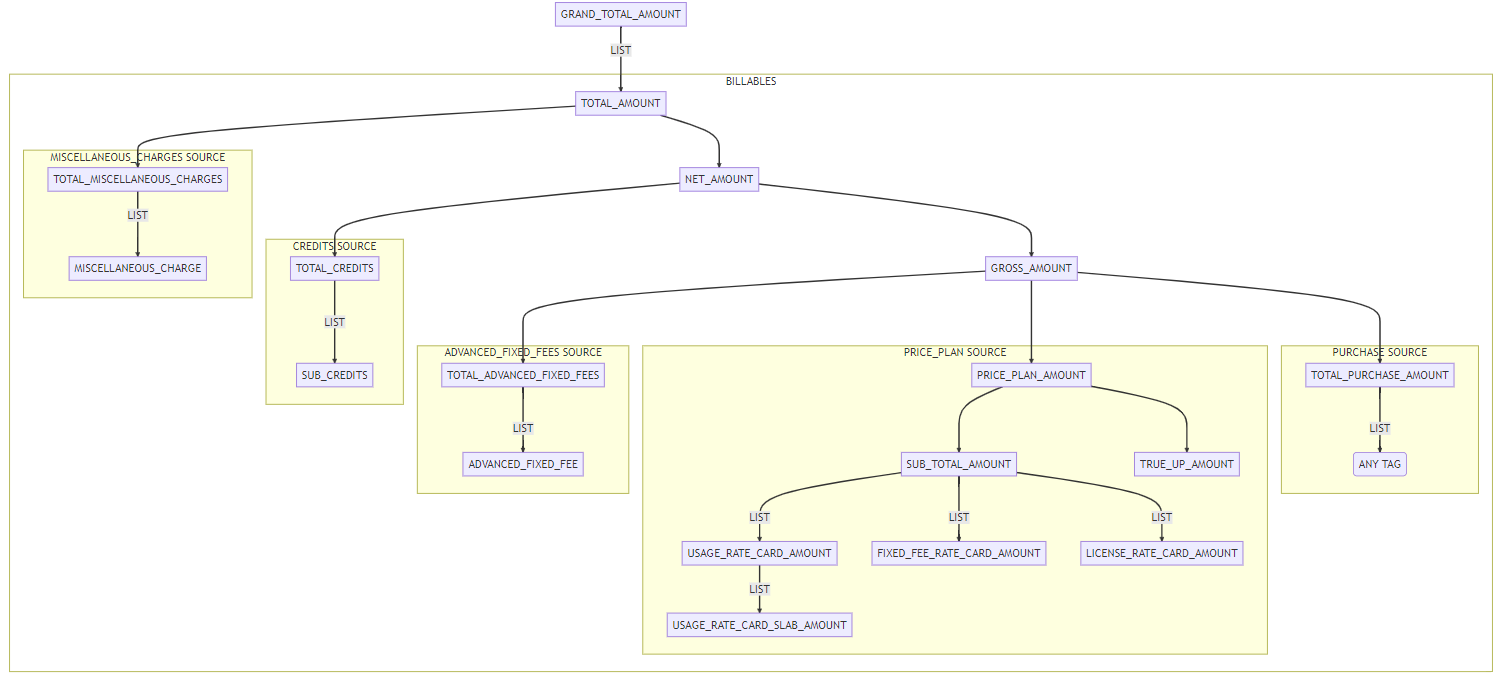
## Invoice structure