> ## Documentation Index
> Fetch the complete documentation index at: https://docs.togai.com/llms.txt
> Use this file to discover all available pages before exploring further.
# Authentication 🔐
Togai uses token based authentication to authenticate API requests.
## Generating New API Keys 🔑
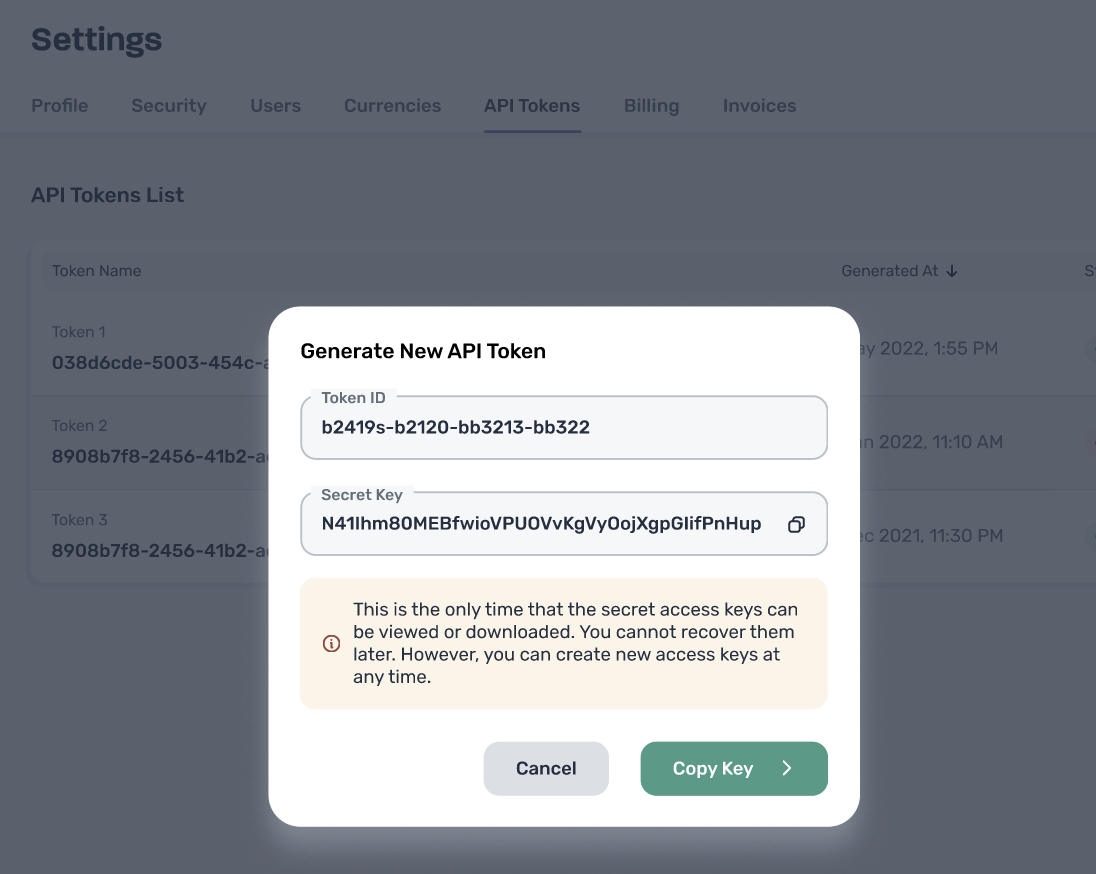
If this is your first time using Togai, you'll likely need to generate a new API key from your Togai web app, [API Tokens](https://app.togai.com/settings/api-tokens) screen. You can do this by navigating in web app ->
1. Click Settings
2. Click API Tokens
3. Generate your first API key! You can do this by clicking the big green button Generate New Token in the center.
You can create multiple API tokens. However, you should copy and store your Secret Key as each Secret Key can be retrieved only once when it is being created.
The Secret key is the Bearer Token used for authenticating your request. It is the token that is used for Authorization in the API request.
 ## Types of authentication
Togai provides 3 types of authentication -
1. Username & Password - this can be used as your authentication mechanism for API but this is not the recommended approach.
2. Long lived secret key - This is the token used from the previous section and used as the Bearer token while making API requests to Togai.
3. Short lived token - You can check the [method here](/api-reference/authentication/get-bearer-token) to generate a short lived API token. The advantage this provides is high throughput performance for the [Ingest API](/api-reference/event-ingestion/ingest-events-to-togai).
We recommend using the short lived token if you need high throughput ingestion for your events.
## Types of authentication
Togai provides 3 types of authentication -
1. Username & Password - this can be used as your authentication mechanism for API but this is not the recommended approach.
2. Long lived secret key - This is the token used from the previous section and used as the Bearer token while making API requests to Togai.
3. Short lived token - You can check the [method here](/api-reference/authentication/get-bearer-token) to generate a short lived API token. The advantage this provides is high throughput performance for the [Ingest API](/api-reference/event-ingestion/ingest-events-to-togai).
We recommend using the short lived token if you need high throughput ingestion for your events.